Complete Infrastructure Lifecycle Automation Platform
Operate infrastructure.
With control.
CLAP brings Linux and Windows operations, patching, compliance, monitoring, access governance, communication, diagnostics and reporting into one enterprise automation platform.
How CLAP works
One governed path from request to evidence.
CLAP connects operational intent, policy, execution, validation, communication and reporting so infrastructure work follows a repeatable lifecycle instead of disconnected manual steps.
Why CLAP
Automation is useful. Governed automation is operationally ready.
Infrastructure teams often use separate tools for execution, patching, monitoring, compliance, approvals, communication and evidence. CLAP connects these workflows so engineers can move faster without losing control, visibility or accountability.
Reduce repetitive work
Turn recurring Linux and Windows activities into controlled, reusable operational workflows.
Coordinate changes
Bring approvals, stakeholder notifications, acknowledgements and execution status into the same operational flow.
Strengthen governance
Apply role, scope, command policy and approval controls before privileged actions are executed.
Prove what happened
Keep execution history, findings, validation evidence and reports available for operations and audit.
Enterprise operating model
Central control without collapsing every workflow into one tool.
CLAP acts as the governed operations layer across infrastructure, repositories, communication providers and evidence sources. Existing enterprise services remain usable while CLAP coordinates the lifecycle around them.
- Central CLAP controller and web portal
- Linux operations over governed remote execution
- Windows operations and controlled remote access workflows
- Customer repository-aware patching
- Microsoft Graph, SMTP and SMTP Relay communication options
- Evidence, reports and audit history retained with the operation
Platform capabilities
Built around the infrastructure lifecycle.
Each capability is designed around three questions: what needs to happen, how it should be controlled, and what evidence should remain afterward.
Automation & Orchestration
Controlled multi-server execution, reusable workflows, command governance and scheduled operations.
Explore automation →Patch Management
Assess, coordinate, execute, validate and report patch activity with change-aware governance.
Explore patching →Hardening & Compliance
CIS-aligned controls, OpenSCAP, native checks, evidence, manual review and governed remediation.
Explore compliance →Service & Config Assurance
Validate critical services and configuration baselines on user-defined schedules.
Explore assurance →Notifications & ACK
Coordinate application, network, backup, security, database and infrastructure teams.
Explore coordination →Diagnostics & RCA
Bring system evidence, timelines, logs and operational history together for faster investigation.
Explore diagnostics →Reports & Audit
Turn infrastructure activity into operational, compliance, patch, capacity and audit evidence.
Explore reporting →Inventory & Capacity
Understand CPU, memory, storage, OS, kernel, packages, virtualization and infrastructure posture.
Explore inventory →Access Governance
Control who can view, approve, execute and administer privileged infrastructure operations.
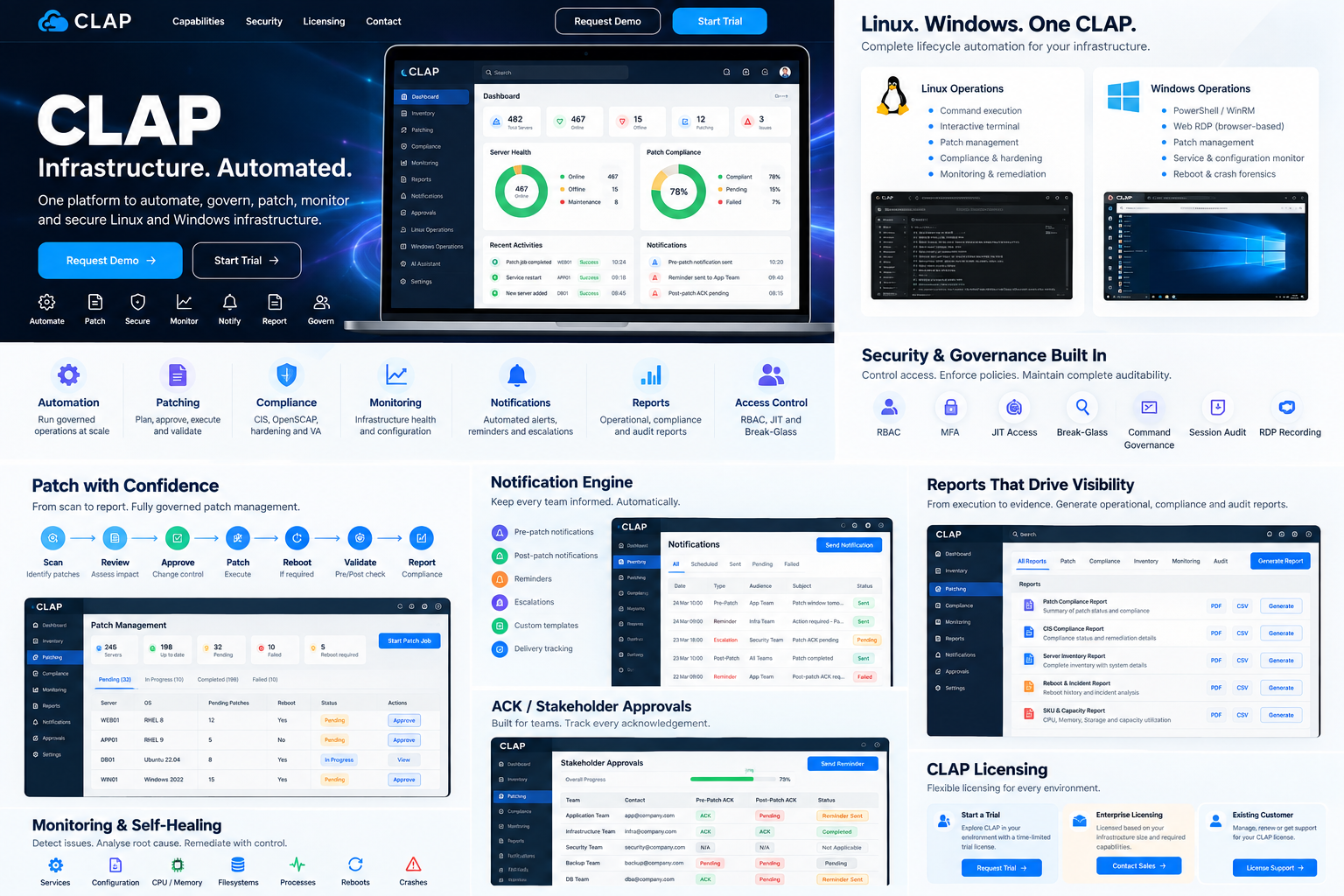
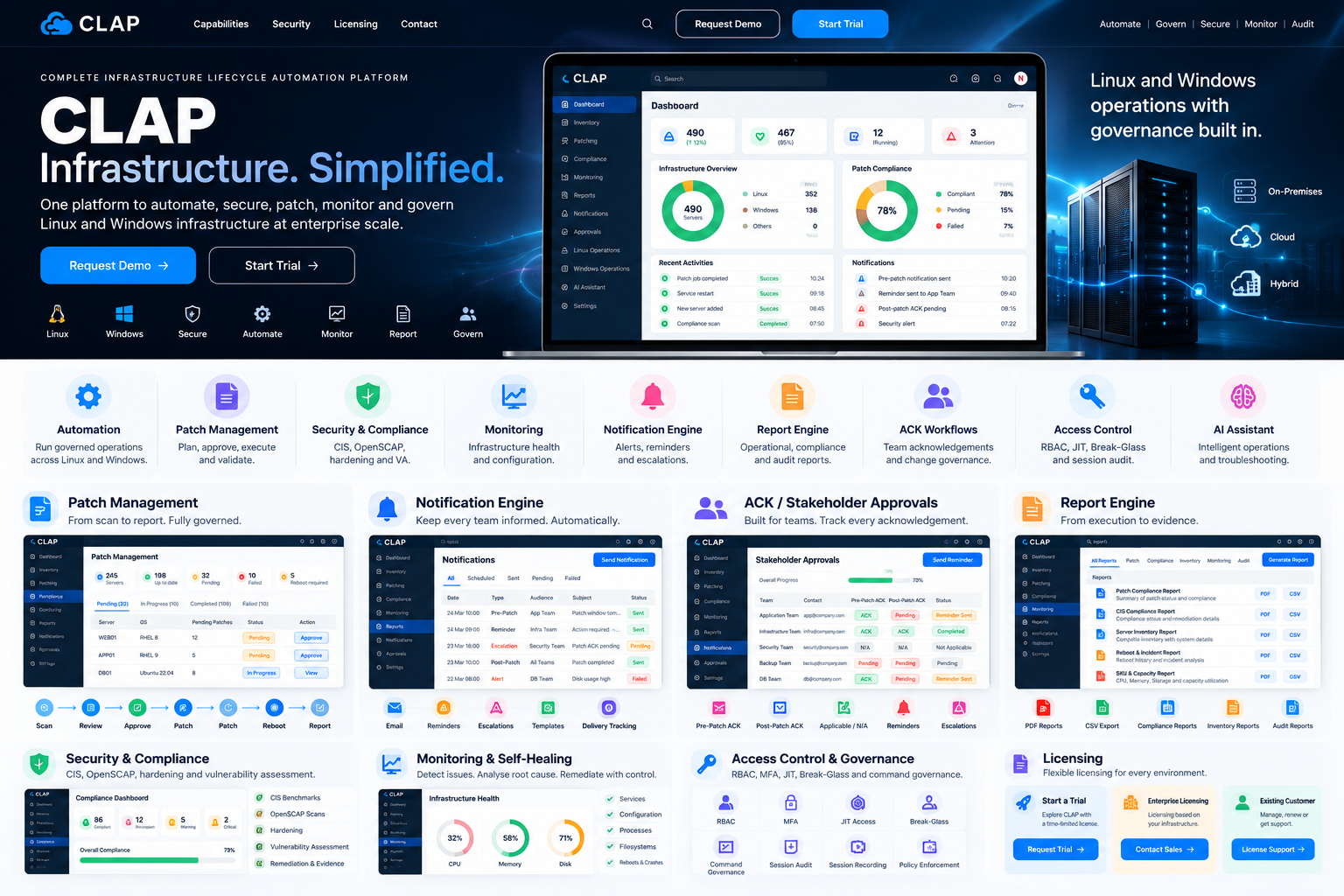
Explore governance →Visual platform overview
Understand the CLAP operating model at a glance.
These product visualizations connect the major CLAP capabilities into a single enterprise operations story.

Automation & Orchestration
Automate repetitive operations without removing operational control.
CLAP provides controlled execution across heterogeneous infrastructure through governed commands, scripts, scopes and approval context.
Run controlled operations at scale
Execute approved activities across individual systems, selected groups or broader server scopes from a centralized workspace.
- Multi-server execution
- Linux and Windows workflows
- Reusable command and script library
- Scheduled operations
Policy before execution
Commands can be approved, restricted or require JIT context, with role and server scope applied before execution.
- Command governance
- Role and user scope
- Approval context
- Execution isolation and history
Faster operations with traceability
Reduce repetitive manual work while preserving visibility into who executed what, where, when and under which control.
Patch Management
From patch discovery to validated completion.
CLAP brings package visibility, change coordination, stakeholder readiness, execution and post-patch evidence into one workflow.
- Installed, available and pending package visibility
- Pre-patch and post-patch validation
- Change Request and patch-wave association
- Repository-aware patch execution
- Kernel and package-state validation
- Server-level and consolidated reports
Operational communication
Changes involve teams. CLAP coordinates them.
Communication and acknowledgement are part of the operational workflow rather than an external follow-up activity.
Communicate every operational milestone.
Generate controlled communications from patching, approvals, monitoring, change workflows and support processes using centrally configured transport providers.
- Microsoft Graph
- SMTP
- SMTP Relay
- Secure task-scoped acknowledgement links
- Communication history
Know who is ready before execution.
Track pre- and post-change acknowledgement from every applicable stakeholder team, including N/A handling and re-verification when corrections are needed.
Hardening · VA · Compliance
Turn security standards into measurable infrastructure posture.
CLAP combines policy, evidence, scanning and controlled remediation so teams can understand not only whether a control failed, but what evidence supports the result.
Know what failed, why it failed and what evidence proves it.
- Compliance profiles and assignments
- Audit-only / dry-run assessment
- Control-level results and evidence
- Manual review workflow
- Vulnerability findings
- Before / after evidence comparison
- Compliance reporting
Safety by design: sensitive network, access, filesystem and service changes should remain governed and validated rather than automatically forced.
Service & Configuration Assurance
Continuously validate the expected state.
Different servers have different critical services and files. CLAP lets teams define what matters, establish a baseline and validate it on a schedule.
- Service discovery and posture
- Inactive, disabled and failed service detection
- User-selected services and configuration files
- Master configuration baseline
- Daily, weekly or monthly validation
- Configuration drift detection
- Controlled corrective action
- Reboot validation
Diagnostics & RCA
Move from symptoms to evidence-backed investigation.
Bring operating-system evidence, service history, performance data, network state, storage events and CLAP operational context together to reconstruct what happened.
Collect evidence
System logs, journals, kernel messages, SAR, ATOP, services, network, storage, configuration, package and operational history.
Build a timeline
Organize related events around reboot, service failure, patch activity, configuration change or an incident window.
Correlate impact
Distinguish primary cause candidates, contributing factors, secondary failures and visible symptoms.
Validate findings
Keep engineering validation in the loop before a preliminary indication becomes a confirmed RCA.
Inventory & Capacity
Understand infrastructure before changing it.
CLAP captures infrastructure characteristics and operational posture so engineers, architects and managers can make decisions using consistent server-level data.
- CPU and memory
- Storage and filesystem visibility
- OS and kernel
- Network characteristics
- Virtualization context
- Installed package inventory
- Capacity and health indicators
- Server and consolidated reports
Useful for
Report & Audit Engine
Every operation leaves evidence.
CLAP turns operational activity into clear records for engineering review, customer communication, management reporting and audit.
- Patch and change reports
- Hardening and compliance reports
- Automation execution history
- Access and approval evidence
- Stakeholder ACK history
- Incident and reboot forensics
- Service/configuration posture
- SKU and capacity reports
Security & Access Governance
Control privileged operations beyond login access.
CLAP applies governance to the operational action itself: who can view it, approve it, execute it, where it can run and what evidence remains.
Keep approval and execution responsibilities separated where required.
Apply permissions to users, roles, customers, landscapes, servers and operational functions.
Keep versions, execution context and audit events available for review.
Heterogeneous infrastructure
One operational experience across Linux and Windows.
CLAP is designed for enterprise environments where infrastructure is rarely one operating system, one team or one operational model.
Use consistent governance, execution history and operational workflows while preserving operating-system-specific controls.
CLAP Support
Support that starts with evidence.
Raise a case, select priority, attach diagnostics and keep the complete conversation tied to the same support record. Full diagnostic collection is designed to work from the CLAP portal or directly from the target server/session without requiring a permanent agent.
- P1 / P2 / P3 / P4 case priority
- Portal and email follow-up on the same case
- Full Linux / Windows diagnostic bundle
- Direct-session standalone collection
- Checksums, manifest and secure upload
- Immediate customer-safe preliminary indication
- Engineering-validated final RCA
Possible WebSocket trust/session validation issue
Connection upgrade succeeded, followed by a trust validation error. CLAP Support is validating the finding.
Customer-visible analysis remains separate from internal research, simulation and engineering-only evidence.
Deployment & operations
Designed for enterprise estates, not a demo lab.
CLAP can sit alongside existing infrastructure services and governance processes while providing a common operational control plane.
On-premises
Operate customer-managed Linux and Windows infrastructure from a centralized CLAP deployment.
Cloud & hybrid
Use the same governed operational model across cloud-hosted and datacenter workloads where network connectivity and policy permit.
Customer repositories
Respect enterprise patching models that use internal repositories rather than assuming unrestricted Internet access.
Controlled connectivity
Keep transport, credentials, approvals and server scope under centralized operational policy.
Versioned change
Separate current production capabilities from planned expansion so roadmap work is not presented as already available.
Rollback-conscious
Use validation, evidence and controlled release practices around platform and operational changes.
Why enterprises use a control plane
Reduce operational fragmentation without hiding engineering detail.
For operations teams
Standardize recurring work, reduce manual coordination and keep validation close to execution.
For security teams
Apply scoped permissions, approvals, evidence and compliance controls around privileged infrastructure activity.
For managers
See operational status, patch posture, acknowledgement readiness, compliance and reporting from one platform.
For auditors
Trace actions, findings, approvals, validation and reports back to the operation that generated them.
Platform evolution
Current capabilities and planned expansion are kept distinct.
CLAP is expanding across the broader infrastructure lifecycle. Capabilities under development are identified separately rather than presented as production-ready functions.
Operational foundation
Automation, patching, hardening/compliance, service/config assurance, reporting, diagnostics/forensics, access governance, notification/ACK workflows and Linux/Windows operations.
Broader infrastructure operations
Advanced disk/filesystem operations, expanded infrastructure self-healing, additional console/infrastructure operations and broader HA/pod architecture.
AI-assisted operations
Controlled diagnostic interpretation, knowledge matching, evidence correlation and engineering assistance — with governance remaining responsible for execution.
Licensing
Flexible deployment. Controlled entitlement.
CLAP licensing can align platform access with server capacity, users, enabled modules, deployment scope and license validity.
Trial
Evaluate selected CLAP capabilities in a controlled environment.
- Time-limited evaluation
- Selected modules
- Server and user limits
- Guided onboarding
Enterprise
Deploy CLAP across Linux and Windows infrastructure at enterprise scale.
- Licensed server capacity
- Licensed users
- Module-based enablement
- Offline license verification
License Support
Activation, renewal and entitlement assistance for existing CLAP deployments.
- Activation assistance
- License renewal
- Capacity changes
- Feature entitlement support
Start a Trial
See CLAP in your environment.
Tell us about your infrastructure and the capabilities you want to evaluate.
Request Demo
See the operational workflow, not just a feature list.
Request a guided demonstration focused on your infrastructure, governance and operational requirements.
Raise Support Case
Tell us what happened.
Choose the priority, describe the impact and attach diagnostic data. Customers can continue the same case through the portal or by replying to the case email.
Frequently asked questions
Understand the platform before the demo.
What is CLAP?
CLAP is the Complete Infrastructure Lifecycle Automation Platform: a governed operations layer for automation, patching, compliance, service/configuration assurance, communication, diagnostics, reporting and audit across heterogeneous infrastructure.
Does CLAP support both Linux and Windows?
Yes. The platform is designed around Linux and Windows operational workflows, while individual capabilities can vary by operating system and deployment context.
Does CLAP require an agent on every server?
Core Linux automation is designed around agentless remote execution. Some integrations or operating-system-specific functions may use their own supported mechanisms, but a permanent CLAP agent is not the default requirement for core Linux operations.
How does CLAP control privileged execution?
RBAC, page permissions, command policy, server/user/role scope, approvals, JIT context and Break-Glass controls can be used to govern who may perform sensitive operations.
Can CLAP work with internal patch repositories?
Yes. The patching model supports environments where customers maintain their own repositories and do not provide direct Internet access to managed servers.
How are notifications and acknowledgements handled?
CLAP can coordinate operational notifications through centrally configured providers such as Microsoft Graph, SMTP or SMTP Relay and track secure task-scoped stakeholder acknowledgement.
Does CLAP automatically remediate every compliance finding?
No. The platform is designed to keep remediation governed. Sensitive network, access, filesystem and service changes should be validated and approved rather than blindly forced.
Are roadmap capabilities shown as production-ready?
No. The public site keeps current platform capabilities and planned expansion distinct so customers can evaluate what is available today versus what is being developed.
CLAP
Ready to simplify infrastructure operations?
Talk to us about automation, patching, security, compliance, monitoring, governance, diagnostics, reporting and enterprise licensing.